 SocialGlyphs
Snapchat Symbols Meaning: Every Arrow, Square and Color Explained
What the red, purple, blue and grey arrows and squares on Snapchat mean — sent, opened, received, screenshot and replay icons in one simple chart.

Snapchat’s chat list is full of little arrows and squares, and they change color and shape constantly. Once you know the two rules behind them, you can read every one at a glance.
Rule 1: The color is the type of message
| Color | Meaning |
|---|---|
| 🟥 Red | A Snap without sound (usually a photo) |
| 🟪 Purple | A Snap with sound (usually a video) |
| 🟦 Blue | A Chat (text message) |
| ⬜ Grey | Pending — not delivered yet, or expired |
Rule 2: The shape is the status
| Shape | Meaning |
|---|---|
| Filled arrow ➤ | You sent it, and they haven’t opened it |
| Outline arrow ▷ | You sent it, and they opened it |
| Filled square ■ | They sent you something you haven’t opened |
| Outline square □ | They sent it, and you opened it |
| Two overlapping arrows | They took a screenshot |
| Circle arrow ↻ | They replayed your Snap |
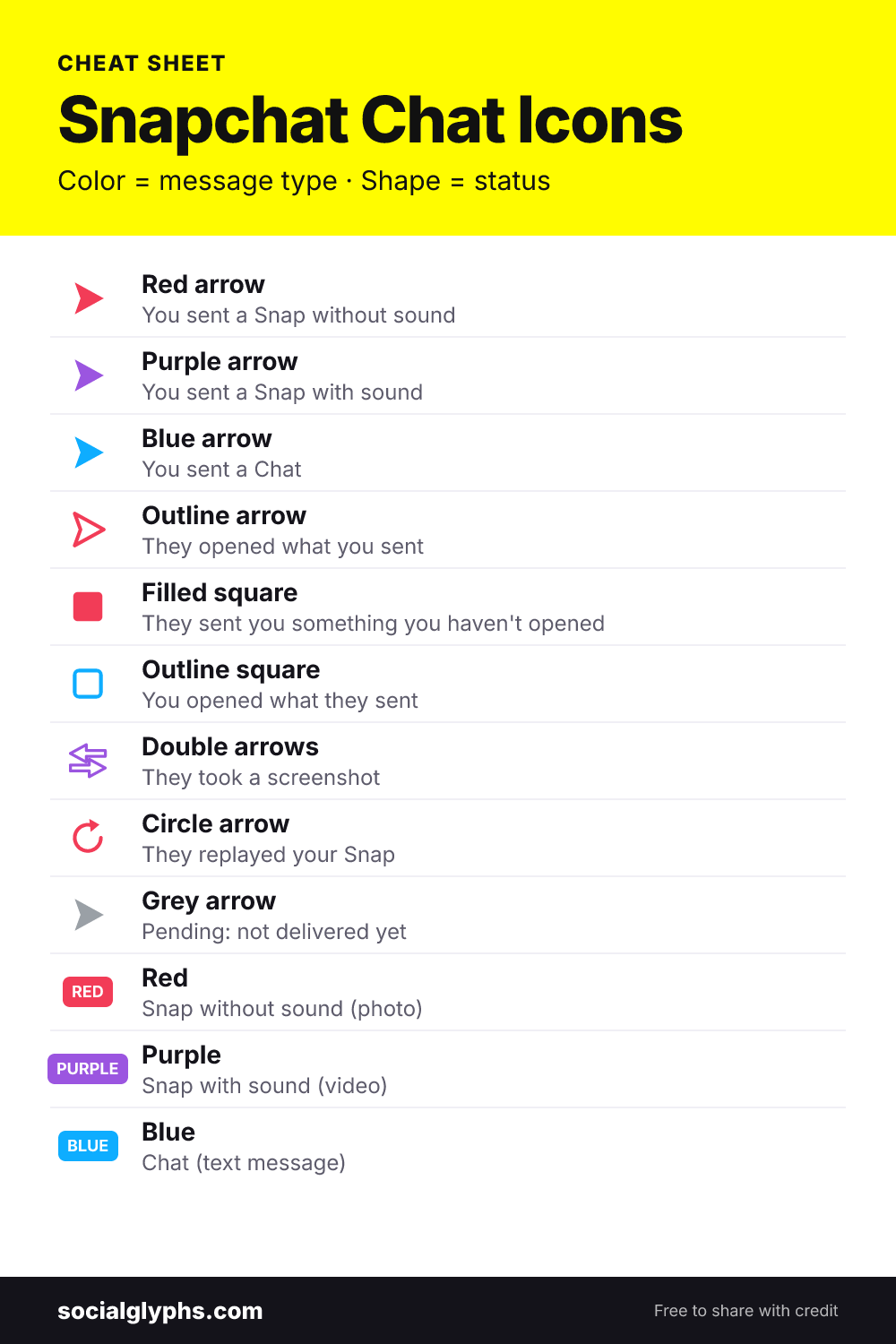
The full Snapchat icon chart
Put both rules together and you get every combination:
| Icon | What it means |
|---|---|
| Filled red arrow | You sent a Snap without sound — not opened |
| Filled purple arrow | You sent a Snap with sound — not opened |
| Filled blue arrow | You sent a Chat — not read |
| Outline red / purple / blue arrow | They opened your Snap or Chat |
| Filled red / purple square | You have an unopened Snap from them |
| Filled blue square | You have an unread Chat from them |
| Outline square | You already opened what they sent |
| Overlapping arrows (any color) | They screenshotted that type of message |
| Circle arrow (red or purple) | They replayed your Snap |
| Grey arrow + “Pending” | Not delivered yet — see why |
What about the emojis next to names?
The arrows and squares are about messages. The emojis next to friends’ names — the yellow heart, the fire, the hourglass — are about your friendship. Those are covered in our guide to Snapchat friend emojis.
Quick tips
- “Delivered” but no outline arrow yet? They received it but haven’t opened it.
- Screenshot icon in a Chat? Snapchat notifies people when you screenshot a chat, too — not just Snaps.
- Opened, no reply? The outline arrow only proves it was opened. It doesn’t tell you they saw every second of a video.
Frequently asked questions
What does a filled red arrow mean on Snapchat?
You sent a Snap without sound and your friend hasn't opened it yet.
What does an empty blue square mean on Snapchat?
You received a Chat from that friend and you've already read it.
What do two overlapping arrows mean on Snapchat?
Your friend took a screenshot. The color shows what they screenshotted: red for a Snap without sound, purple for a Snap with sound, blue for a Chat.
What does a circle arrow mean on Snapchat?
The circular arrow is the replay icon — your friend replayed your Snap.
Why is my Snapchat arrow grey?
A grey arrow with Pending means the Snap or Chat hasn't been delivered, usually because the person hasn't added you back.

Affan Ahmed is an SEO specialist with a BSc in Computer Science who has worked in search and social media marketing since 2022. He tests every symbol and feature on SocialGlyphs on his own phone before writing about it.